
CONNECTED WORKFORCE COMPETENCY
UX DESIGN \ CASE STUDY
Honeywell Connected Workforce Competency is a cloud-based solution that provides extensive simulation-based training for operations staff. Trainees gain knowledge and hands-on experience for analysis and decision-making tasks with mentorship available anytime and anywhere. This program offers access to high-fidelity training scenarios and content, all through cloud deployment, which allows trainers to mentor and assess trainees remotely without requiring on-premise infrastructure.

Problem Statement

-
Continuous Access to Training: The COVID-19 pandemic has necessitated remote and flexible training options, making it imperative for organizations to provide continuous access to training materials and resources. Traditional training methods are often unable to meet the demands of a distributed workforce, hindering the ability of employees to acquire essential skills.
-
Collecting and Consolidating Disparate Training Data: Organizations frequently struggle with the aggregation and management of training data from various sources, leading to inefficiencies and difficulties in tracking employee progress, competency levels, and training effectiveness.
-
Cost-Effective Scalability: As organizations seek to provide training at scale, cost-effectiveness becomes a significant concern. Traditional in-person training methods often incur high costs, especially when considering the need to train a large and dispersed workforce.

Professional
Outcome
New enhanced user experience (UX) for the product with new features and functionalities to meet the needs of current industry/users. Migration of the legacy native products to the Honeywell Forge cloud platform so that it can integrate seamlessly with other Honeywell Forge products.
UX Contribution
UX Workshops, UX Researcher, Concept Design & Interaction Design, Requirement Understanding, Persona Research, Problem Understanding, Secondary Research, Data Analysis, Research Insights, Data visualization, Persona, Journey Mapping, Function & Intent Finding, Information Architecture, Storyboarding, Usability Testing, Process Documentation.
01
Collaborative Learning
Secure, high-quality competency tools that support remote training for instructors and trainees, fostering a collaborative learning environment.
03
Flexible Deployment
Provide multiple training options, including classroom, virtual, and on-demand sessions, catering to both self-paced learners and instructor-led programs.
05
Enterprise-Wide Insights
Monitor and report key performance indicators (KPIs) on competency progress using persona-based dashboards or LMS-integrated systems.
02
Seamless Accessibility
Ensure uninterrupted training by offering anytime, anywhere access to scalable competency programs.
04
Comprehensive Training Curriculum
Access industry-leading training simulators and knowledge retention tools, customized for contextual learning and assessments.
06
Expert Guidance & Support
Receive continuous support from Honeywell’s system experts, ensuring relevant training and up-to-date assessments.

Product
Vision


Sprint Planning
-
Assigning Stories & Story Points as per Epic requirements and the design process.
-
Daily sync-up (morning stand-up, evening TAM) with Scrum teams (to get know about the project progress updates and dependencies).
-
Start the design process (the process depends on what design stage we are at).
-
UX review, feedback and validation sessions with the team & SME’s (multiple sessions as per requirement).
-
Finalised design handover to the development team (XD, Sketch, Invision spec links and prototypes shared on the team Confluence page).
-
Process documentation: maintaining project Confluence page (UX) as per design progress.
-
Engineering teams decide the extent to UX adherence and prioritise feature development as per their bandwidth, technical capability and release plan.
-
Daily sync-up with the development team to ensure the design is being developed properly (UI design and interaction).
-
Sprint-closure demo: developed design (Dev teams) & new design for upcoming features (UX team).
-
Raising defects on developed design for the Dev teams to consider fixing in the next sprint or before release.
PI Planning
-
Review Business Goals and Product Vision with stakeholders and Product Owners.
-
Align cross-functional teams (Design, Dev, QA, Product, Marketing) on quarterly priorities and roadmap.
-
Break down Epics into high-level features and capabilities to be distributed across upcoming sprints.
-
UX team presents high-level design strategy and upcoming research outcomes that impact roadmap decisions.
-
Identify design dependencies and align timelines with engineering feasibility and capacity.
-
Allocate UX bandwidth across initiatives, with priority for innovation, NPI, or customer experience-critical items.
-
Set key success metrics for each design initiative (usability, performance, business value).
-
Update Confluence and Jira boards with PI roadmap, milestone tracking, and design handoff plans.
-
Team-wide commitment ceremony to confirm alignment, with buffer time for unplanned discovery or change.
-
Conduct retrospective for the previous PI cycle to identify improvement areas and process gaps.
Research Activities
-
Identify problem areas from stakeholder feedback, support tickets, and analytics dashboards.
-
Plan and execute user research based on priorities—interviews, surveys, usability testing, heuristic reviews.
-
Collaborate with Product Managers to frame research objectives and define hypotheses.
-
Recruit users from relevant personas for qualitative and quantitative studies.
-
Conduct sessions, document findings, and prepare research insights with visual evidence (screenshots, quotes, recordings).
-
Share insights with stakeholders through walkthroughs or dedicated research readout sessions.
-
Translate findings into design opportunities, user needs, and improvement backlog items.
-
Maintain a central Research Repository in Confluence or Notion for future access and cross-functional visibility.
-
Validate design decisions through rapid testing (low or mid-fidelity prototypes).
-
Reflect research impact during PI Planning and Sprint Planning to guide better user-centric design work.

Discovery Workshop
The Discovery Workshop was a collaborative and comprehensive series of sessions designed to enhance understanding of user needs, stakeholder priorities, and experience outcomes for the development of Connected Competency. The workshop aimed to create a roadmap for the successful delivery of a user-centered offering through a series of structured activities that engaged participants from various roles.


01. UXRL(User Experience Readiness Level)
What Are We Solving?
In a discovery workshop, we focus on identifying the most critical user pain points that impact business goals. The goal is to align stakeholders on key challenges, ensuring we solve problems that drive the most value for users and the organization.
Why These Problems and Not Others?
-
User-Centric Prioritization: We validate problems through UX research, user feedback, and data insights.
-
Business Impact: We select issues that align with company objectives, such as conversion rates, engagement, or retention.
-
Feasibility & Effort: We assess technical constraints and resources to ensure the solution is achievable within scope.

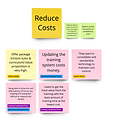
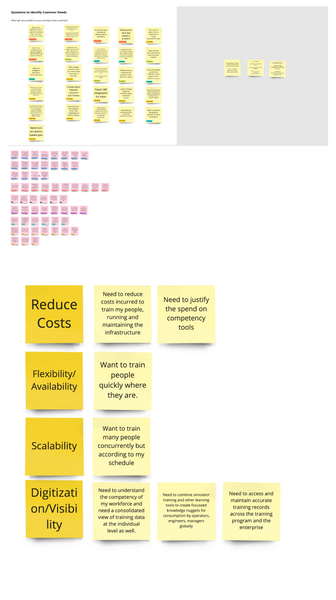
Customer Needs



Priority Matrix

02.Stakeholder mapping

04.XO(Experience Outcome)
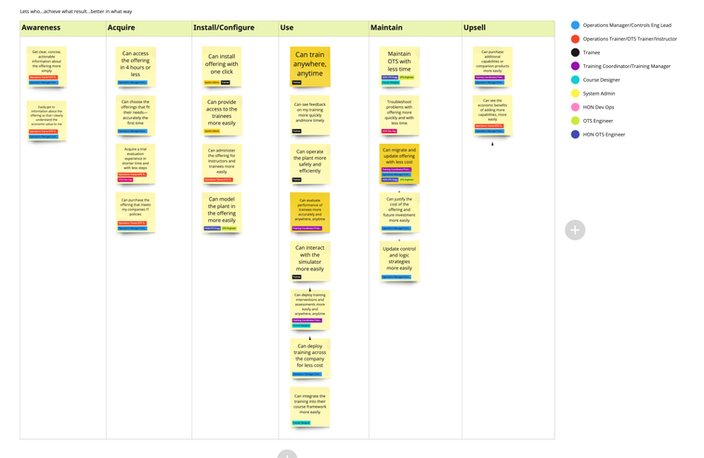
Customer painpoints

Customer Segment


05.personas


Detailed Experience Outcomes

06. System Study & User Flow

Brainstorming

07.Backlog Grooming and User Stories

Ideation based on Stories


Usability testing with Concept design
Here are the three key action points based on the feedback:
Improve Lesson & Training Module Clarity
-
Clearly associate lessons with their respective training modules, especially when users have multiple assignments.
Optimize Status & Sorting Logic
-
Sorting order: In Progress → Unsuccessful → Not Taken → Successful.
-
Use clear status labels: NA (Not Started), In Progress, Successful/Unsuccessful, No Results (if exited early).
-
Ensure resume options appear only when relevant.
Simplify Start & Resume Actions
-
Combine "Start" and "Resume" into a single row for a cleaner UI.
-
Ensure instructor-led session failures and notifications are clearly indicated.
-
Show training duration only for completed or in-progress sessions.
HIGH fidelity Screens of Trainee


HIGH fidelity Screens of Instructor


HIGH fidelity Screens of Instructor with admin privilege

CWC 2.0
Planning


.jpeg)


Long Term Vision


